
How to Check Backlinks: Free Ways to Audit Any Site’s Links
Backlinks decide how much search engines trust your site — but you cannot manage what you cannot see. Here is how to check your own backlinks (and a competitor’s) for free, and how to tell the links that help from the ones that hurt.
Short version: use Google Search Console for the links Google knows about on your own site, a free backlink checker for quick snapshots of any domain, and a full SEO suite when you need depth. Below is the workflow, in that order, plus the quality checks that turn a raw link list into decisions.
Why checking backlinks matters
A backlink profile is your site’s reputation, written in other people’s HTML. Search engines use links to discover pages, understand how sites connect, and judge how much trust a page deserves — so a link you lose, or a bad one you gain, can move your traffic long before you notice it in a dashboard. Regular checks are how you see those changes while they are still cheap to act on.
In practice, an audit does four concrete jobs:
- Monitor profile health — know who points to you, which pages earn the links, and whether the overall shape still looks natural and balanced
- Spot toxic spikes early — a sudden burst of spammy or irrelevant links is far easier to review and contain when you catch it in weeks, not after rankings slip
- Uncover competitor gaps — the publishers, roundups and resource pages linking to rivals but not to you form a ready-made outreach list
- Validate campaign results — when you invest in digital PR or outreach, new live links are the concrete proof the work actually landed
For PR-driven sites the habit matters even more. Every press release campaign should end with a verification pass: did the placements go live, do the links point where they should, and are they dofollow? That five-minute check is the difference between assumed coverage and proven coverage.
Check your own backlinks in Google Search Console
Search Console is the only free source that shows links straight from Google’s own index — a first-party view of what Google has actually found. If your property is verified, it is the natural place to start before any third-party tool.
Step by step: finding and exporting your links
The whole route takes about a minute once you know where the report hides:
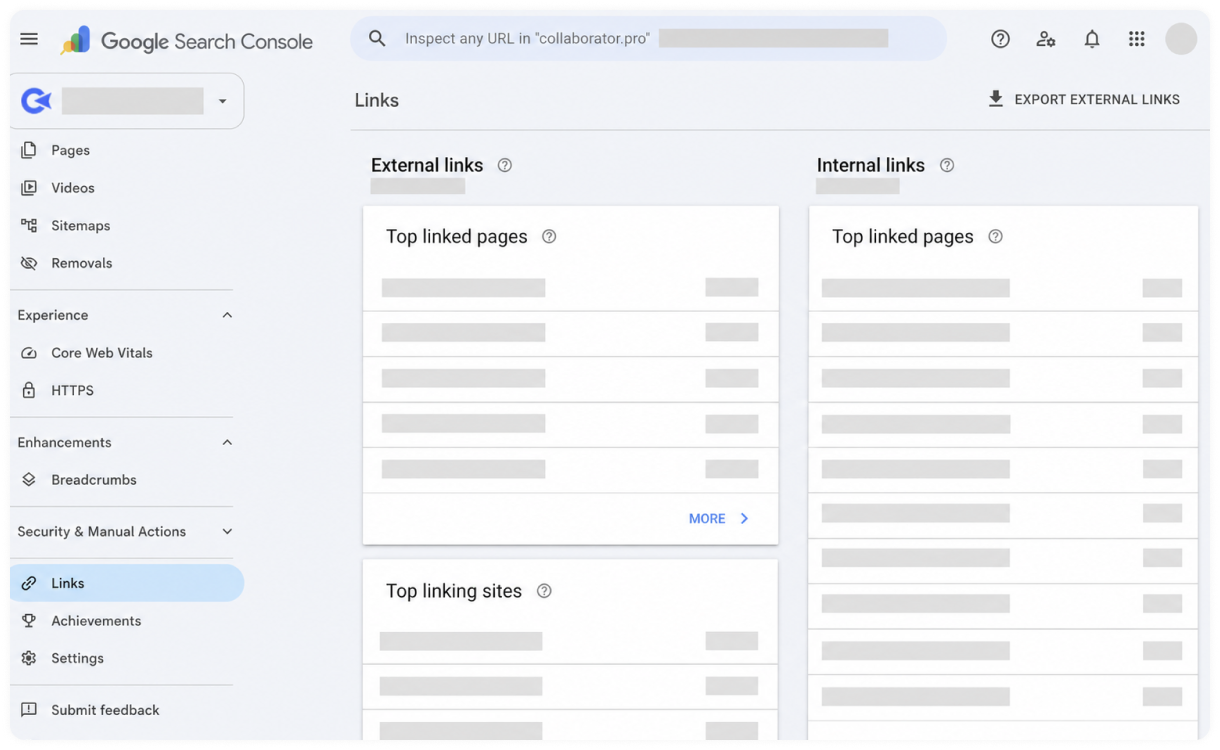
- Open Google Search Console and pick the verified property for your site from the selector in the top-left corner
- Scroll down the left-hand navigation and click Links, near the bottom, to open the Links report
- Under External links, work through the three sub-reports: Top linked pages (the URLs of yours earning the most links), Top linking sites (the referring domains pointing to you) and Top linking text (the anchor text others use)
- Click into any sub-report for the detailed list of linking pages behind each figure
- Use the Export button in the top-right corner to download the data as a spreadsheet or CSV for sorting and filtering
Know the limits of the free data
Search Console shows a sample rather than your complete profile, so treat totals as directional, not exact. It offers no authority metrics to help you weigh one link against another, it cannot look at sites you do not own — competitor data is completely off-limits — and its exports do not state each link’s attributes, so you cannot tell dofollow from nofollow in the downloaded file. Treat it as ground truth for direction on your own site, then use dedicated checkers for scoring and competitor work.
The fastest free way to check any domain
Free online backlink checkers trade depth for speed: paste a domain and you get referring-domain counts, top links, anchor distribution and a rough authority score within seconds. They are perfect for first impressions — vetting a partner site, eyeballing a competitor, or sanity-checking your own growth month to month.
A dedicated checker also adds layers Search Console simply does not have. You can analyse any domain instantly, with no ownership verification. You get history — newly found versus lost links over time — so you can see whether a profile is growing or quietly shrinking. Links come split by attribute, dofollow versus nofollow, and anchor distribution is shown as a whole, which makes keyword over-optimisation easy to spot at a glance.
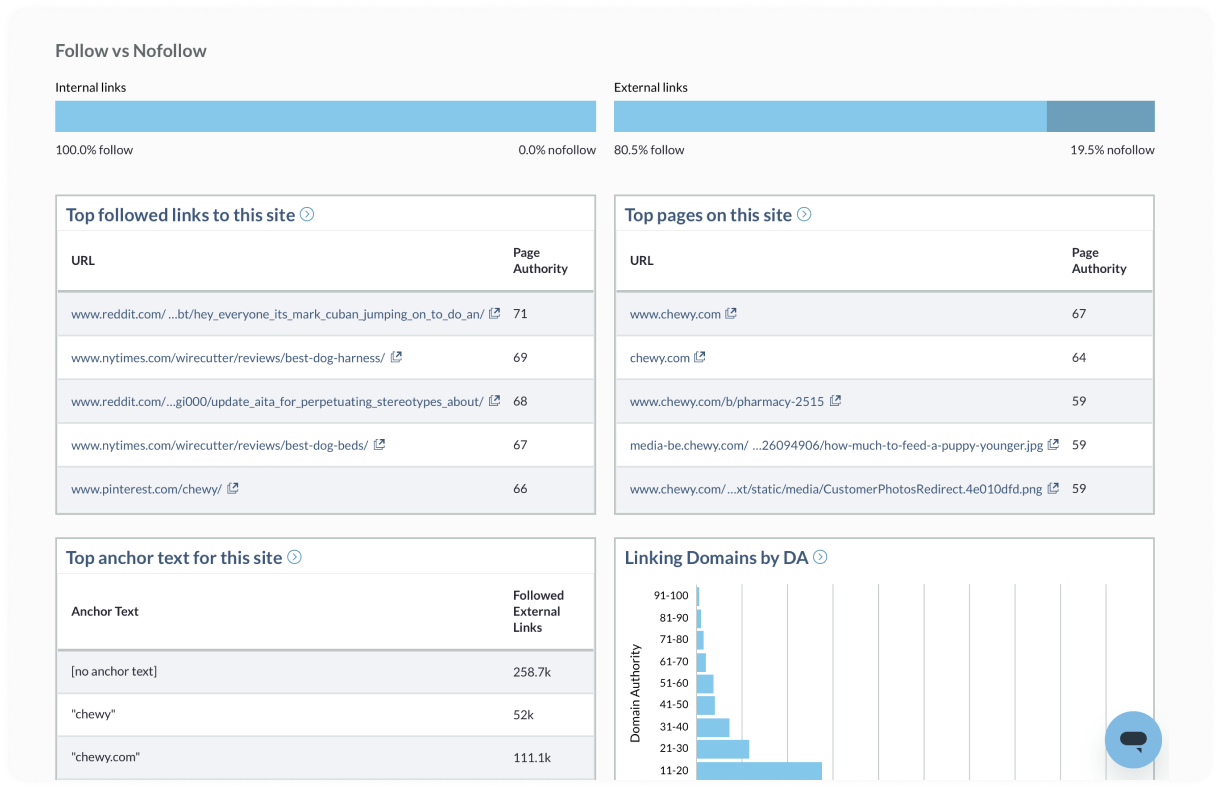
Two free tiers are worth knowing well. Moz Link Explorer, free with an account, shows a domain’s top linked pages, its top anchor texts and its linking domains ordered by Domain Authority, alongside the follow/nofollow split — useful when the question is not just who links, but how strong those linking sites are. Ubersuggest’s free backlink tool leans the other way: its report adds a spam score, Domain and Page Authority, anchor text and first seen / last seen dates for each link. Treat that spam score as a review signal, not a verdict — it tells you which links deserve a manual look, nothing more.
The Ahrefs free backlink checker is a handy third view for a quick strongest-links snapshot. Whichever you start with, expect caps: free tiers typically show the top slice of links and limit daily queries, and each tool’s index differs, so the same domain can report noticeably different totals. Cross-check with two tools before quoting any number. When you need to verify a specific page’s links rather than a domain’s whole profile, run the page through a dofollow link checker to see exactly which outbound links pass equity and which are nofollowed.
Can you check a competitor’s backlinks?
Yes — backlink data is public, and competitor analysis is where it pays best. Pull the link profile of a rival that outranks you and look for patterns rather than individual links: which sites link to them repeatedly, what content earned those links (data studies, tools and original research dominate), and which referring domains link to several of your competitors but not to you. That last list is your outreach shortlist — sites that already link out to your niche and have simply never heard of you.
Press coverage is easy to spot in these profiles: clusters of news domains appearing in the same week usually mean a distribution campaign. If a competitor is earning steady news links and you are not, the gap compounds every month.
How to judge whether a backlink is any good
Not all links are assets. Score the ones you find against five quick criteria:
- Relevance — the linking site and page are topically close to yours
- Authority — the domain has its own strong link profile and real rankings
- Traffic — the site receives genuine organic visits, not just metric inflation
- Placement — the link sits inside editorial content, not a footer or a link farm page
- Anchor text — natural, varied wording rather than repeated exact-match keywords
A link failing three or more of these is not helping you, whatever the raw count says. A handful of relevant, editorial, trafficked links will outperform hundreds of directory scraps every time.
Turn findings into three action lists
A raw export helps nobody. Sort every finding into one of three lists, and the audit turns into work you can actually finish:
Links to protect and monitor
Your valuable links: relevant, editorial placements on real sites. Note the page, the target URL and the anchor, then watch them. If the linking page moves, gets redesigned or drops the link in an update, you want to know quickly — these are the links worth a polite email to restore.
Links to review for risk
Anything matching a toxic pattern: sudden spikes from unrelated sites, clusters of identical exact-match anchors, or links from pages with no real audience. Review the actual pages before acting — a scary score alone is not evidence — and remember Google ignores most low-quality links on its own.
Competitor links to pursue
The gaps: sites linking to two or more competitors but not to you, especially listicles, roundups, resource pages and niche publishers. Rank them by relevance and how realistic they are to earn, and they become your next outreach campaign.
Keep the rhythm light but regular: a quick check monthly to catch losses and spikes, and a full audit every four to six months to rebuild the three lists. Track the same numbers each time — referring domains, new and lost links, top anchors, and your best pages — so trends, not one-off totals, drive your decisions.
What to do after the check
Turn findings into a short task list. Reclaim lost links by contacting the site (pages move and links break — many webmasters restore them when asked politely). Reinforce what works: if a guide or a release earned links, update it and promote the next one the same way. Note toxic clusters for monitoring rather than panic — Google ignores most low-quality links automatically, and disavow is a last resort for clear manual-action territory. Finally, schedule the next check. Link profiles decay and grow constantly; a quarterly audit rhythm keeps surprises small.
And when coverage is the gap — competitors earning news links while your profile is thin — the fastest legitimate fix is a story worth linking to, distributed properly. That is precisely what PressFudge distribution is built for: hundreds of editorial placements, each one reported with its live link so your next backlink check shows the difference.
Frequently asked questions
What is the best free tool to check backlinks?
For your own site, Google Search Console — the data comes from Google itself. For any other domain, free tiers of dedicated checkers give a useful top-level snapshot; combine two of them for a fair picture.
How many backlinks should my site have?
There is no magic number. Compare against the sites ranking for your target keywords: if they average 80 referring domains and you have 12, the gap is the story — not the absolute count.
Do nofollow links show up in backlink checks?
Yes, good checkers list them and label the attribute. Nofollow links from real coverage still drive referral traffic and brand discovery, so count them — just do not mistake them for ranking equity.
How often should I check my backlinks?
Run a light check monthly — new and lost links, plus any sudden spikes — and a full audit every four to six months. Sites that earn links quickly, or run frequent campaigns, benefit from checking after every campaign as well.
Can a free checker replace a paid SEO suite?
For snapshots and small sites, often yes. Paid suites earn their cost when you need complete exports, long link history, alerts the moment links appear or disappear, and data at scale across many competitors — free tiers cap all four.
Ready to get your story published?
PressFudge distributes your press release to hundreds of real news outlets — with a publication guarantee and a live-link report for every campaign.
See pricing & publish
The PressFudge team distributes press releases for startups, brands and agencies - and writes about what actually works.