
Ahrefs, Explained: The Complete Guide to Every Major Tool
Ahrefs is the SEO platform most professionals measure websites with — but its depth can overwhelm new users. This complete guide explains each major tool in plain language: what it shows, when to use it, and how the whole suite fits a real research workflow.
Ask a room of SEO specialists which tool they would keep if they could only keep one, and Ahrefs wins most rooms. It pairs one of the web’s largest backlink indexes with keyword data, content research and rank tracking in a single interface. This guide is a tour of the whole platform: the key metrics, the five core tools, the free extras, and a straight answer on who actually needs a subscription.
What makes Ahrefs different
Three things. First, the index: Ahrefs crawls the web relentlessly, so its backlink data is fresh enough to spot a competitor’s new campaign within days. Second, the metrics: Domain Rating and its siblings are the closest thing SEO has to a common currency. Third, the workflow: every report answers a practical question — who links to this page, which keywords that site ranks for, what content in this niche earns attention — without exporting to three other tools.
Pricing follows a tiered subscription model, from a starter tier for smaller sites up to enterprise plans with more crawl credits, tracked keywords and historical depth. A free Webmaster Tools tier exists for sites you own and verify, which is the sensible way to learn the interface before paying anything.
What Ahrefs costs
Ahrefs is a subscription, and the honest way to read its pricing page is not by the headline price but by what each tier unlocks. Plans scale from an entry tier upward — historically from around a hundred dollars a month on annual billing for the lightest plan, rising through mid tiers for freelancers and in-house teams to agency and enterprise levels several times that — and exact figures change often enough that you should always confirm them at ahrefs.com/pricing before budgeting. What matters more is the shape of the ladder, because every step up buys the same kinds of things in larger amounts.
First, projects and seats: how many websites you can add as projects, and how many people can use the account at once. Second, credits. Modern Ahrefs plans ration much of the platform through a monthly credit pool — opening reports, running exports and loading certain views consumes credits, so a cheap plan used carelessly can feel smaller than its feature list suggests. Third, depth: higher tiers track more keywords in Rank Tracker, crawl more pages in Site Audit, keep report history for longer, update data more frequently and allow larger exports. Entry tiers are genuinely usable for one site or a small portfolio, but they limit historical data and the number of rows you see in the biggest reports.
That credit system rewards a deliberate working style. Check the overview before opening five detailed reports. Use filters early instead of exporting everything and sorting it in a spreadsheet. Save important reports rather than re-running them. Teams that treat credits as a budget usually find a mid tier plenty; teams that audit a new competitor domain every hour will feel the ceiling of any plan below the top ones.
Then there is the free route. Ahrefs Webmaster Tools is free for websites you own and can verify — through a DNS record, an HTML file, a meta tag or Google Search Console access. In return you get Site Explorer data for your own properties, a Site Audit with its health issues, and a useful view of your backlinks and the keywords you already rank for. Its limits are real: you cannot research competitors with it, reports are capped, and some advanced filters and historical views are held back for paying users. But for a single site owner learning the interface, monitoring their own links and fixing technical problems, it is often enough — and it is by far the best way to decide whether the paid platform fits how you think before any money changes hands.
The metrics everything else builds on
Domain Rating (DR) scores a domain’s backlink strength from 0 to 100 on a logarithmic scale; URL Rating (UR) does the same for individual pages. Referring domains counts the unique sites linking in, while the organic traffic and keyword figures are modelled estimates of search performance. Hold two cautions alongside them: the traffic numbers are estimates, not analytics, and DR measures link strength only — never content quality or trust. Our companion piece on reading Ahrefs metrics for outlet research goes deeper on using them without fooling yourself.
The logarithmic part of DR deserves emphasis, because it changes how you should read gaps. Moving from DR 10 to DR 20 is a modest achievement that a new site can manage with a handful of decent links. Moving from DR 60 to DR 70 takes vastly more link equity, and the last stretch toward 80 and 90 belongs mostly to household-name domains with enormous, diverse profiles. So a five-point gap at the top of the scale is a chasm, while a five-point gap near the bottom is noise. DR is also relative: it is calculated against every other domain in the index, which means your score can drift even if your own profile barely changes, simply because everyone else moved.
UR applies the same idea at page level, counting both external links and internal links from elsewhere on the site. That makes it useful in two different jobs. Externally, it helps judge whether one specific article or landing page — not just its domain — carries real weight. Internally, a page with a high UR next to a strategically important page with a low one is a hint about where internal links should flow. Ahrefs Rank adds a third view: a straight league table of domains by link profile, where a lower number is better and the very top is occupied by the giants of the web. It is rarely a working metric, but it is a quick reality check on scale.
Referring domains and total backlinks must always be read together, never separately. Ten thousand backlinks sounds formidable until you learn they come from twelve domains — usually sitewide footer or sidebar links, a directory scrape, or one enthusiastic partner. A profile built from a thousand referring domains is almost always healthier and harder to copy than one built from a thousand links on ten sites. Watch the ratio, watch how the referring-domain count grows over time, and be suspicious of any profile where backlinks surge while referring domains stay flat.
Organic traffic inside Ahrefs is a model, not a measurement. The platform estimates it from the keywords a site ranks for, the positions it holds, typical click-through rates for those positions, and search volumes. That makes it excellent for comparing two competitors or spotting a trend — a site doubling its estimated traffic in three months is doing something real — and poor at telling you how many visitors actually arrived last Tuesday. Traffic value translates the same estimate into money: roughly what that organic traffic would cost to buy through paid search, based on keyword costs per click. A small site with high traffic value is reaching commercially valuable searches; a huge site with low traffic value may be famous for information nobody monetises. Keyword counts, finally, simply tally how many queries a domain ranks for in the top 100 results, by country — breadth that means little until you look at how many of those rankings sit in the top three, where the clicks actually live.
Where else Ahrefs metrics surface
DR in particular has escaped the platform. The free Ahrefs SEO Toolbar — a browser extension for Chrome and Firefox — shows DR, UR, backlink counts and traffic estimates on any page you visit and directly inside Google results, so research happens while you browse rather than in a separate session. Site owners quote their DR in pitch decks and media kits, outreach tools and marketplace listings display it as a shorthand for quality, and other SEO platforms and articles cite it when comparing domains, even though each rival maintains its own competing score. That ubiquity is convenient, but it also tempts people to treat DR as a goal in itself. It is not a Google metric, Google does not use it, and a link bought purely to inflate it adds risk without adding audience. Use the metrics to ask better questions; never let the score become the strategy.
Site Explorer: backlinks and competitor analysis
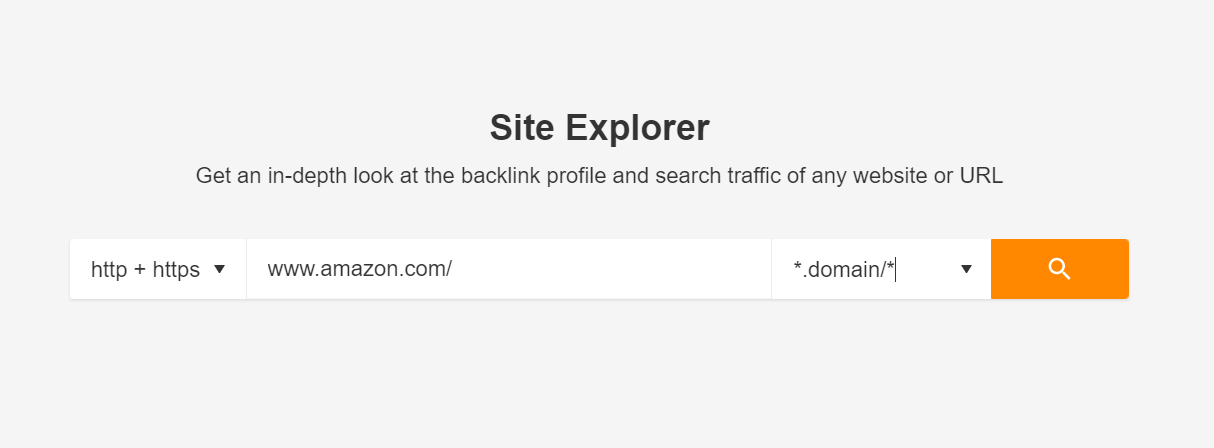
Site Explorer is the heart of Ahrefs. Enter any domain and you get its link profile, organic keywords and top pages in one dashboard. The reports PR and SEO teams live in:
A sensible workflow starts wide and narrows fast. Begin on the overview: DR, referring domains, estimated traffic and the shape of the growth charts tell you in ten seconds whether this is a substantial site, a fast riser or a shell. Then open the backlink profile itself and filter before you read — dofollow links only, one link per domain, grouped by similar links — because raw lists reward the sites with the messiest footers, not the strongest profiles. Sort what remains by the authority of the linking page, read a sample of the actual pages to judge relevance and editorial quality, and only then draw conclusions. The difference between a useful Site Explorer session and an afternoon of scrolling is almost always those first filters.
Backlink profile and referring domains
See every known link, filter by dofollow, platform or language, and watch the referring-domains chart for growth patterns. Steady upward slopes are earned; vertical spikes deserve suspicion. The referring domains report is the cleaner of the two views: one row per linking site, with its DR, traffic and the number of links it sends you, which makes it the right place to judge quality. Check the mix — news domains, industry publications, directories, forums, obvious spam — and the language and country spread. A profile that matches the site’s claimed audience looks natural; a B2B software firm linked mainly from unrelated coupon blogs does not, whatever its headline counts say.
New and lost links
The new/lost reports turn monitoring into a habit: new links reveal what is working (and what competitors just did), while lost links on your own site are often recoverable with one polite email. Used well, the calendar view behind these reports becomes a diary of a competitor’s marketing — a burst of new domains in one week usually means a campaign, a launch or a piece of research that travelled, and clicking through shows you exactly which. For your own site, sort lost links by the value of the linking page before mourning any of them: most losses are scrapers, expired pages and housekeeping, but a lost editorial link from a strong domain is worth one courteous message asking whether the page moved.
Cross-link analysis: Link Intersect
Enter several competitors and one click lists domains linking to them but not to you — the single most productive outreach report in the tool. Sites already linking to multiple rivals have demonstrated they link out in your niche. Treat the output as a prioritised prospect list rather than a mailing list: start with domains linking to three or more of your competitors, check what kind of page carries those links — resource lists, reviews, roundups, supplier directories — and pitch the same format with a genuinely better asset. You can also run the intersect against a single page or section, which is how you find who links to a rival’s guide but not to yours on the same topic.
Top pages, best by links and anchors
Top Pages shows which of a site’s pages earn its search traffic; the companion view, often called Best by Links, ranks pages purely by the referring domains pointing at them — and the gap between the two lists is the insight. Pages high on links but modest on traffic are usually linkable assets: original research, free tools, definitive guides, statistics pages. Pages high on traffic but thin on links are ranking on domain strength and are vulnerable. Study the first group to plan your own content and the second to plan your attacks. The anchors report, meanwhile, shows the words other sites use to describe you — invaluable for spotting both brand perception and over-optimised anchor patterns. A healthy profile is dominated by brand names, URLs and natural phrases; one stuffed with exact-match money keywords is either manipulated or about to look that way.
Broken backlinks, outgoing links and the other views
The broken backlinks report lists links pointing at pages on a site that now return errors — for your own domain, a recovery list you can fix with redirects or a quick note to the linking site; for a competitor’s domain, a prospect list, because those linking sites clearly wanted to cite something that no longer exists and may accept a working replacement. Outgoing links deserve a look in the opposite direction: who a site links to reveals its partnerships, its affiliate relationships and sometimes its ownership network. Site Explorer also separates organic from paid search views, so you can see which keywords a rival buys, which landing pages carry its ads, and how its paid footprint compares with its organic one — useful context before assuming all of a competitor’s visibility was earned.
Link growth history and batch analysis
Every Site Explorer overview carries history charts for referring domains and backlinks, stretching back years, and reading them is the fastest forensic test in SEO. Healthy profiles climb in steps and plateaus that line up with launches, campaigns and seasons. Unnatural ones jump vertically in a week, often in a single language or from a single type of site, and sometimes fall just as fast when the scheme is removed or discounted. When you need the same headline picture for many domains at once — a prospect spreadsheet, a portfolio review, a market map — Batch Analysis is the workhorse: paste in up to a few hundred domains or URLs and get DR, traffic, referring domains and keyword counts back as one comparable table, ready to sort, filter and export instead of opening two hundred tabs.
Keywords Explorer: planning what to target
Type a topic and Keywords Explorer returns difficulty scores, search volume, click estimates and a deep list of related queries grouped by parent topic. Two features deserve attention: the traffic potential figure, which estimates what the top-ranking page earns across all its keywords (a far better target than single-keyword volume), and the SERP overview, which shows the actual pages you would have to beat — their DR, links and traffic laid bare.
For PR planning this is reconnaissance gold. If the top results for your announcement’s theme are all DR 70+ news domains, you know the story needs distribution muscle behind it; if the SERP is full of weak pages, a well-placed release and a solid landing page can take the slot. A keyword generator helps brainstorm the angles before you validate them here.
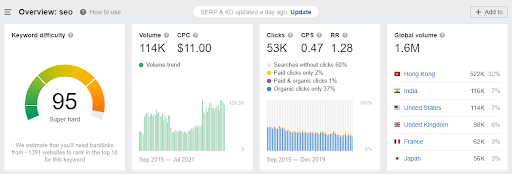
Keyword Difficulty (KD) estimates how hard it would be to reach the first page, largely from the link profiles of the pages already ranking: a high score means the top ten is held by pages with many strong referring domains, and Ahrefs translates that into a rough sense of how many links a challenger would need. Treat it as a weather forecast, not a law — it says nothing about content fit, search intent or whether your domain’s overall authority gives you a tailwind — and always read it next to the SERP overview itself. Two keywords with the same KD can be very different fights depending on whether the incumbents are focused specialist pages or indifferent sections of giant generalist sites.
The click metrics are where Ahrefs quietly out-thinks simpler tools. Volume counts searches; clicks count how many of those searches ended in someone actually clicking a result. Featured snippets, knowledge panels, ads and answer boxes absorb searches without sending visits anywhere, so a high-volume keyword can deliver surprisingly little traffic, while clicks per search and return rate — how often people search the same thing again — reveal behaviour volume alone hides. Navigational and news-driven queries behave differently from research queries, and the metrics let you see that before you invest in content.
Three more views complete the picture. The SERP overview includes a volatility or history perspective: a top ten that has barely moved in a year signals a settled result where Google is satisfied, while a churning one signals an unsettled query where a strong new page has a real opening. Ranking history shows how individual pages have moved for the term over time, which exposes seasonal patterns and one-off spikes. And the parent topic groups each keyword under the broader topic the top-ranking page actually targets — because searchers typing a specific phrase are often best served by one comprehensive page about the parent theme, not a thin page built for the phrase alone.
A worked example: judging one keyword in five minutes
Say you are considering a guide built around a training-related phrase in your industry. Open it in Keywords Explorer and read in this order. First, volume and clicks: modest volume is fine if nearly every search produces a click, and worrying if most searches end without one. Second, difficulty and the SERP overview together: note the DR range of the top ten, the referring domains behind the top three pages, and whether those pages are dedicated to the topic or passing mentions. Third, traffic potential: if the page ranking first earns several times the headline volume across all the phrases it ranks for, the real prize is bigger than the keyword suggests — and your page needs to cover those sibling phrases too. Fourth, intent and cost per click: a high CPC confirms commercial value and warns you that advertisers, and therefore competitors, care about this searcher. Finally, volatility: if positions have shuffled monthly, plan to publish, promote and revisit; if the top ten is frozen, decide honestly whether you can out-link and out-write it. Five minutes of that sequence replaces the far more common method — chasing the biggest volume number in the list — and it is the difference between a content calendar and a wish list.
Site Audit: technical health on a schedule
Site Audit crawls your own site and grades it across more than a hundred checks: broken pages, redirect chains, slow templates, missing metadata, orphaned pages. Findings arrive prioritised by impact with plain-language explanations, and scheduled re-crawls turn it into an early-warning system. If you prefer a desktop crawler you control manually, our Screaming Frog guide covers that workflow; many teams run both.
The checks themselves span the whole anatomy of a site: crawlability and indexability, redirects and broken internal links, duplicate or missing titles and descriptions, thin and duplicated content, orphan pages with no internal links pointing to them, slow-loading templates and oversized images, HTTPS and security issues, hreflang and localisation mistakes on multilingual sites, and problems in structured data and social tags. Each project gets a single health score, which is deliberately crude — its job is to tell you at a glance whether the site is improving or rotting, and to give non-technical stakeholders one number they can follow without a lecture.
The real value is in the prioritisation underneath that score. Issues are grouped as errors, warnings and notices, and every issue explains in plain language what is wrong, why it matters and which exact URLs are affected. That ordering matters because a typical first crawl returns hundreds of findings and only a fraction deserve your next sprint: a template error generating broken pages across a whole section outranks a handful of missing image descriptions every time. Work errors first, sample warnings before mass-fixing them, and let notices wait for a quiet week.
Two habits turn Site Audit from a one-off report into a system. Schedule crawls — weekly for an active site — so regressions are caught when a deploy breaks something, not months later when traffic has already sagged. And compare audits side by side: the comparison view shows which issues a release fixed, which it introduced and how the health score moved, which is exactly the evidence you need in a post-mortem or a client report. Crawl scope is configurable too — follow sitemaps, include or exclude subdomains and folders, respect or test robots rules — so large sites can be audited in meaningful segments rather than swallowed whole.
Content Explorer: find topics proven to earn links
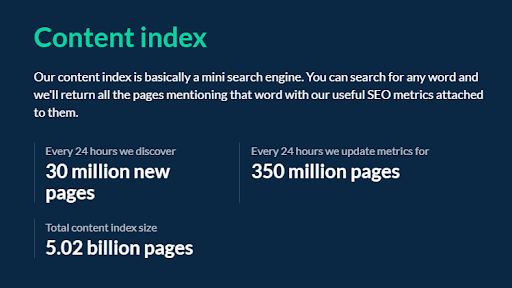
Content Explorer searches billions of pages by topic and filters by the things that matter — backlinks earned, organic traffic, social shares, publish date. It answers the creative’s hardest question with data: what has this audience already rewarded? Broken-page mode finds dead content that once had many links (a ready-made outreach angle), and the authors database helps locate journalists and writers in a niche.
Think of it as a search engine built for marketers rather than readers. You query a topic, a phrase in a title, or a specific site, and every result arrives already scored: the domain’s DR, the page’s referring domains and estimated traffic, social sharing signals where available, the language and publish date, and the author where one can be identified. Filtering is where it earns its keep. Restrict a topic to pages published in the last year with at least a set number of referring domains and you have a reading list of formats your niche currently rewards. Flip the filters — high organic traffic, very few referring domains — and you find a different treasure: pages ranking on content merit and topical fit rather than link weight, which are often the easiest rankings to challenge and the clearest proof that a topic does not need a huge budget to win.
Two uses deserve special mention. The first is broken content revival: filter a topic to pages that are now dead but once carried links, and you have both a validated subject — people demonstrably linked to it — and a ready outreach list, namely every site still pointing at the corpse, whose owners would usually rather link to a live, updated replacement than to an error page. The second is link-earning content analysis at scale: export the top linked pages in a niche and code them by format — research, calculators, glossaries, opinion, data studies — and patterns emerge in minutes that would take weeks of browsing to notice. Add the author information and the same export doubles as a prospect list of writers who already cover the subject and the outlets that publish them.
Rank Tracker and the supporting cast
Rank Tracker monitors your chosen keywords across locations and devices, charting visibility against competitors you nominate. Around the core tools sit useful extras: a batch analysis mode for scoring many domains at once, a domain comparison view, alerts for new backlinks and mentions, and a suite of free mini-tools (backlink checker, keyword generator, SERP checker) that handle quick jobs without a login. Ahrefs also maintains a substantial free education library — blog, video tutorials and beginner courses — which genuinely is one of the better SEO schools available at any price.
In practice, Rank Tracker is set up once and read weekly. You add the keywords that map to real pages and real revenue — not every phrase you have ever ranked for — tag them by page, topic or intent so reports can be sliced meaningfully, and specify the locations that matter, down to city level for local businesses. Desktop and mobile are tracked separately, because the two results pages differ and mobile is where most searches now happen; a keyword that is third on desktop and eleventh on mobile is not “about seventh”, it is a mobile problem to fix. Positions are then charted over time alongside the features the results page carries, so a drop can be diagnosed properly: losing clicks while holding position usually means a new snippet, ad block or answer feature is intercepting them.
The competitor view is the part managers actually read. Add rival domains and Rank Tracker shows their positions for your tracked set, their visibility trends, and a share-of-voice style picture of who owns the results pages you care about. That turns vague anxiety — “a competitor is doing well” — into a specific list of keywords they gained, pages that earned them, and dates it happened, which Site Explorer can then explain. Scheduled email summaries keep stakeholders informed without dashboard access, and that combination — quiet monitoring, loud alerts when something moves — is the right rhythm for rank data, which is too noisy to watch daily and too important to check quarterly.
Additional tools and free tools
Beyond the five headline tools, a layer of smaller instruments handles jobs that come up constantly. Batch Analysis, already mentioned, scores hundreds of domains or URLs in one table. Domain Comparison places several sites side by side across the core metrics for a fast competitive snapshot. Content Gap shows keywords your competitors rank for that you do not — the keyword-level cousin of Link Intersect. Alerts automate vigilance: new and lost backlinks, new keywords, and web mentions mentioning your brand or your chosen terms, delivered by email so monitoring does not depend on anyone remembering to log in. Web Explorer, and Ahrefs’ own search engine experiment Yep, sit at the more exploratory end of the catalogue — interesting for seeing the web through the index’s eyes, optional for most day-to-day work.
Then there is the free shelf, which is larger than most people realise and needs no subscription, though results are trimmed compared with the paid reports. The free Backlink Checker shows a domain’s top links, anchors and linked pages. The Keyword Generator returns ideas with difficulty and volume estimates for Google and for platforms such as YouTube, Bing and Amazon. The SERP Checker reveals the current top results for a term in a chosen location, with SEO metrics attached, and the Keyword Difficulty Checker isolates just that score when it is all you need. The Traffic Checker gives a quick estimate of a site’s organic and paid traffic, the Broken Link Checker surfaces a sample of broken inbound and outbound links, and the Website Authority Checker reports DR on its own. Ahrefs has also added free AI-assisted writing utilities — outline, title and text helpers for the blank-page stage of content work. None of these replaces the platform, and that is the point: they are accurate samplers, ideal for a quick check, a classroom, or verifying a claim in a sales deck before it becomes your problem.
Learning Ahrefs
Ahrefs teaches unusually well for a software company, and new users should budget an afternoon for it before judging the tools. Ahrefs Academy offers structured video courses — platform walkthroughs and broader SEO and marketing training — that take a beginner from the vocabulary to complete workflows in order. The help centre underneath it documents every report and metric in searchable detail, which becomes the reference you return to long after the courses end.
For ongoing learning, the Ahrefs blog publishes data studies, experiments and tactical guides rather than thin promotional posts, and its YouTube channel covers much of the same ground in video, including full beginner-friendly series. The flagship free resource is the Beginner’s Guide to SEO, a structured, chaptered introduction that starts with how search engines work and ends with measurement — genuinely suitable as a first curriculum for a junior hire, after which the platform itself makes far more sense. Learning the tool and learning the discipline turn out to be the same project, which is part of why the ecosystem keeps its users.
Who needs Ahrefs — and who can skip it
If links, rankings or competitor research are part of your job — in-house SEO, agency work, digital PR — a seat pays for itself in time saved. If you run one small site and check rankings monthly, the free Webmaster Tools tier plus Search Console covers you. Either way, remember what the platform is: a measuring instrument. It tells you where you stand; the standing improves through the work itself — better content, real coverage, and links earned or placed on sites that pass the very checks described above. When you are ready to act on what the data shows, that is where distribution comes in.
Frequently asked questions
How can I use Ahrefs more efficiently?
Work from questions, not dashboards: build a shortlist of competitors, save them as projects, set backlink alerts, and standardise on three reports — Link Intersect for prospects, Top Pages for content ideas, and New Backlinks for monitoring. Fifteen focused minutes beats an hour of wandering.
Are there limits on checks, and can they be raised?
Every plan carries monthly credits for reports and crawls, and higher tiers raise them. Verify your own sites in the free Webmaster Tools tier to stretch a budget — owned-site data there does not burn the same limits.
What are the main alternatives to Ahrefs?
Semrush is the closest all-in-one rival, Moz offers a friendlier on-ramp with its own authority metrics, and Majestic specialises in link analysis. Most professionals pick based on which interface and index they trust for their market.
Is Content Explorer worth it?
For content-led link building and PR ideation, yes: filtering a niche’s pages by links earned turns brainstorming into evidence. If you never plan content around link earning, Site Explorer alone may cover your needs.
What are the limits of the free Webmaster Tools tier?
Webmaster Tools is free only for sites you own and verify, and that boundary defines it: your own backlinks, rankings and a Site Audit health view are included, while competitor research in Site Explorer, full Keywords Explorer work and the deeper historical and export features stay behind the paid plans. Report rows and crawl scope are also capped. For running one site well, those limits rarely bite; for agency or competitor work, they are the reason the subscription exists.
Do I need Ahrefs if I already use Google Search Console?
They answer different questions. Search Console reports what Google measured on your own site — real impressions, clicks and the queries that produced them — and no third-party tool can replace that ground truth. Ahrefs adds everything Search Console cannot show: competitors’ links and keywords, market-wide keyword data, content research across the whole web, and modelled estimates for sites you do not own. Most serious workflows use both, checking estimates against Search Console reality rather than trusting either alone.
Ready to get your story published?
PressFudge distributes your press release to hundreds of real news outlets — with a publication guarantee and a live-link report for every campaign.
See pricing & publish
The PressFudge team distributes press releases for startups, brands and agencies - and writes about what actually works.